• About
  • Contact Us
  • Privacy
  • Terms
  • Disclaimer
logo SolitaireSoc Hub
Menu
  • Home
  • Hypercasual
  • Racing
  • 3d
  • Arcade
  • Clicker
  • About
Sign In
U User ▾
Profile Logout
  1. Home
  2. /
  3. Module
  4. /
  5. Construct a Mechanical Bear Challenge
Construct a Mechanical Bear Challenge
Developer Rush Interactive
Updated 2026-07-21

Construct a Mechanical Bear Challenge

Puzzle Assembly Strategy

Share:

Reviews

Construct a Mechanical Bear Challenge stands out for its thoughtful integration of construction and puzzle elements. The assembly phase encourages creativity, while the training arena offers varied challenges that test different skills. Customization options add personalization without overwhelming. The absence of ads or purchases makes it a safe choice for families. A well-designed game that respects a child's pace.

About This Game

Assembly Mechanics

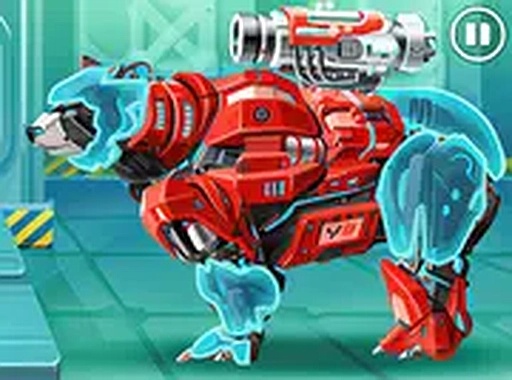
Players start by selecting a base body for their mechanical bear. From there, they attach limbs, a head, and optional accessories. Each piece fits together using a simple drag-and-drop interface. The system encourages experimentation, as different combinations affect how the bear moves and interacts with challenges later on. This core loop of selection and connection forms the foundation of the experience.

Training Arena Challenges

Once assembled, the bear enters a training area filled with three types of tests. Obstacle courses require careful timing to navigate gaps and barriers. Target challenges ask players to aim and launch projectiles at stationary or moving marks. Jigsaw puzzles present a grid of scattered pieces that must be arranged before a timer expires. Each activity builds different skills, from coordination to spatial reasoning.

Customization Options

After completing training sessions, players can personalize their bear with a range of colors and surface patterns. The customization screen offers sliders and swatches for each part, allowing for detailed adjustments. This feature adds a layer of ownership and encourages repeated play, as children often enjoy tweaking their creation to match their preferences.

Progression and Replayability

The game saves progress automatically, so players can return to their partially completed bear at any time. New parts and challenge variations become available as players achieve higher scores in the training arena. This gradual unlock system keeps the experience fresh without overwhelming younger audiences. The combination of building, testing, and decorating ensures each session feels distinct.

Family-Friendly Design

No in-app purchases or third-party advertisements interrupt play. The interface uses large, clearly labeled buttons and responds to both mouse and touch input. Visual feedback, such as highlighting valid drop zones, helps prevent frustration. The overall tone remains calm and encouraging, with positive reinforcement for completing tasks rather than penalties for mistakes.

Compatibility

Play on Any Device | Chrome / Safari / Edge Recommended

Faq

What age group is Construct a Mechanical Bear Challenge designed for?
The game is designed for children aged 6 to 12, though younger players may also enjoy it with adult guidance. The simple controls and non-competitive structure make it accessible to a wide range of ages.
Can I play Construct a Mechanical Bear Challenge on a tablet?
Yes, the game supports touchscreen devices. The drag-and-drop mechanics work well on tablets and smartphones, though a larger screen is recommended for comfortable play.
Are there different difficulty levels in the training arena?
The game does not explicitly label difficulty levels, but the challenges gradually increase in complexity as players progress. Obstacle courses become longer, targets move faster, and jigsaw puzzles have more pieces.
How many parts can I use to build the mechanical bear?
The exact number of parts is not specified, but the game includes a variety of body segments, limbs, and accessories. Players can mix and match to create many unique combinations.
Does the game require an internet connection to play?
No, Construct a Mechanical Bear Challenge can be played offline after the initial download. No online features or advertisements are present, making it suitable for travel or areas with limited connectivity.
Can I save multiple bear designs?
The game saves the most recent bear configuration automatically. It does not appear to support multiple save slots, so players will need to overwrite their current design to try new combinations.

Comments

0 comments
U
User
★ ★ ★ ★ ★
Please login to post a comment.
Loading comments...

Similar Releases

Ancient Emblem Tile Puzzle
▶ Play

Ancient Emblem Tile Puzzle

Casual Puzzle Match-3
Fortress Designer: Build & Expand
▶ Play

Fortress Designer: Build & Expand

Construction Puzzle Planning
Gem Path Puzzle Challenge
▶ Play

Gem Path Puzzle Challenge

Puzzle Strategy Logic
Supermarket Discount Dash
▶ Play

Supermarket Discount Dash

Casual Puzzle Mind
Age Calculator & Zodiac Discovery Tool
▶ Play

Age Calculator & Zodiac Discovery Tool

Puzzle Trivia Educational
Critter Keepers: Tower Tactics
▶ Play

Critter Keepers: Tower Tactics

Kids Strategy Puzzle
Aerial Leap: Ascending Platform Adventure
▶ Play

Aerial Leap: Ascending Platform Adventure

Casual Strategy Platformer
Sweet Treat Tile Swap
▶ Play

Sweet Treat Tile Swap

Match-3 Puzzle
Cosmic Pathfinding Challenge
▶ Play

Cosmic Pathfinding Challenge

Space Logic Puzzle
Connect the Dots: Square Capture
▶ Play

Connect the Dots: Square Capture

Board Games Puzzle Logic
Heart Sparkle Bubble Burst
▶ Play

Heart Sparkle Bubble Burst

Puzzle Bubble Pop Casual
Quick Math Logic Quest
▶ Play

Quick Math Logic Quest

Puzzle Logic Math

© 2026  SolitaireSoc Hub All rights reserved.

Report an Issue

Let us know what's wrong with this game

Share this page

Copy the link below to share this page: