

Rhythm Key Bounce
Reviews
Rhythm Key Bounce stands out by blending two distinct skill sets: keyboard typing and musical timing. The core loop is simple but addictive, with each correct key press providing satisfying audio and visual feedback. The gradual difficulty increase feels natural, pushing players to improve without becoming frustrating. The energy system adds tension without being punishing. For anyone seeking a quick mental workout that improves coordination, this game delivers a polished, engaging experience.
About This Game
Core Gameplay Loop
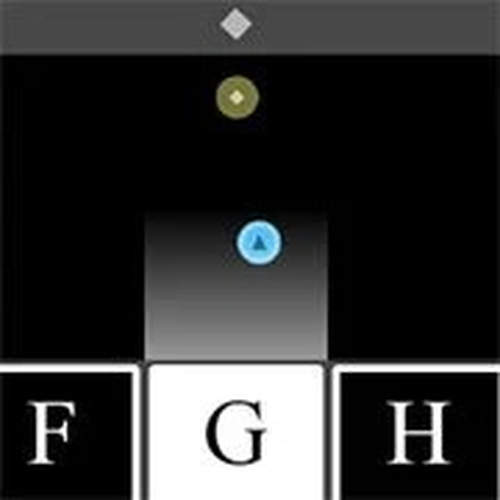
In Rhythm Key Bounce, players watch a ball descend vertically on the screen. When the ball reaches a marked target zone, a letter appears. Pressing the corresponding key on the keyboard sends the ball bouncing upward, allowing the player to collect energy points. This cycle repeats, with the ball descending again and a new letter appearing. The challenge lies in matching the correct letter quickly and accurately to maintain the bounce and avoid losing energy. The game's design emphasizes a tight feedback loop between visual cues, keyboard input, and rhythmic timing.
Energy and Progression
Energy serves as both a score and a lifeline. Each correct key press adds energy, extending the play session. Missing a letter or pressing the wrong key reduces energy. When energy depletes, the game ends. As players advance, the game introduces more letters and a faster tempo, requiring quicker reactions and better multitasking. The energy system rewards consistent accuracy and punishes mistakes, creating a clear sense of progression as players improve their speed and precision over time.
Visual and Audio Design
The game uses a clean, minimal visual style that keeps the focus on the ball and the letter prompts. The background may feature subtle musical themes or color changes that respond to the player's performance. The audio component is central: a rhythmic beat or melody plays throughout, with sound effects for correct and missed inputs. This audio feedback helps players stay in sync with the game's pace and reinforces the connection between typing and music.
Skill Development and Replayability
Rhythm Key Bounce is designed for short, repeatable play sessions. Each attempt offers a chance to beat a previous high score or improve reaction time. The gradual increase in difficulty ensures that beginners can learn the basics while experienced players face a genuine challenge. Regular practice helps develop typing speed, hand-eye coordination, and the ability to maintain focus under pressure. The game's simple premise and deep skill ceiling make it suitable for quick breaks or extended practice.





Comments
0 comments