

Melody Mix Playground
Reviews
Melody Mix Playground succeeds by making music creation feel like a game. The drag-and-drop interface is intuitive, and the variety of characters provides enough depth for interesting compositions. The ability to adjust individual volumes adds a layer of control that rewards experimentation. Its cross-platform accessibility and lack of barriers make it a standout choice for casual creative play.
About This Game
Getting Started with Sound Arrangement
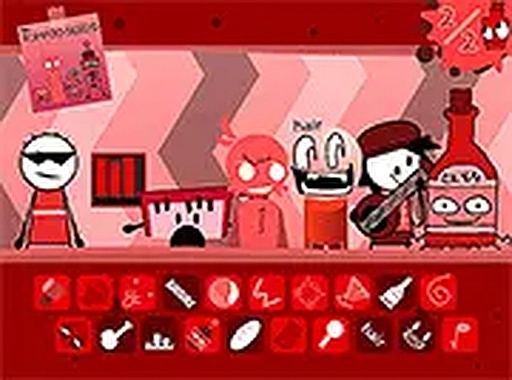
Upon opening the game, players see a row of colorful characters at the bottom of the screen. Each character represents a specific sound, such as a drum beat, a bass line, or a chime effect. To begin building a piece, simply drag a character onto the central stage. The sound plays immediately, and you can add more characters to stack different audio layers. Removing a character is just as easy: drag it off the stage, and its sound stops. This straightforward interaction makes the experience accessible to anyone, regardless of age or technical skill.
Building Your Audio Palette
The game offers a variety of sound types, from steady rhythms to melodic phrases and ambient effects. By placing multiple characters on stage, you create a rich, multi-layered composition. Each character's sound is distinct, allowing for endless combinations. For example, you might start with a simple beat, then add a bass line, and finally introduce a melody. The interface provides a visual representation of each sound, so you can see at a glance which elements are active. This visual feedback helps you keep track of your mix as it grows.
Fine-Tuning Your Mix
Once characters are on stage, you can adjust the volume of each individual sound. Tapping or clicking a character brings up a simple slider that lets you increase or decrease its loudness. This control is essential for balancing different elements so that no single sound overpowers the others. You might want a soft background rhythm with a prominent melody, or a strong beat with subtle effects. The ability to tweak each layer independently gives you the precision to craft the exact mood you want.
Designed for Spontaneous Creativity
There are no scores, timers, or objectives in this game. The only goal is to explore and enjoy the process of combining sounds. This pressure-free environment encourages experimentation. You can try unusual pairings of characters, swap them in and out, and listen to how the overall piece changes. The game is built to be used in short sessions or extended periods of creative play. Its simple controls and immediate feedback make it easy to pick up and put down at any time.
Cross-Platform Accessibility
The game runs entirely in a web browser on both desktop computers and mobile devices. There is no software to install and no account registration required. This means you can start playing instantly on any device with an internet connection. The interface is optimized for touchscreens, so dragging characters on a tablet or phone feels natural. A full-screen mode is available to remove distractions and focus entirely on the audio and visual experience. This flexibility makes the game ideal for quick creative breaks or longer sessions at home.









Comments
0 comments